Hierarchies are quite difficult to represent correctly in a flat structure such as that of a SQL Table. Recently, I had to work on finding possible looks in a db hierarchy. In this post I will share with you the tips I gathered all around the internet to solve this problem efficiently.
First of all, the legacy code in the application I was working on, needed to do some validations before inserting a user into the hierarchy. Since all the validations and hierarchy navigation was done in the business layer of the application, every iteration through the tree represented a call to the DB. In the worst case scenario you will find yourself visiting all of the records of the DB one by one. Not only accessing them but loding them and transfering them from the DB server to the application and so on.
We had to come up with a solution to handle all that 'hierarchy' logic in the Database. To present to you what we did, I will use the I will make use of the Northwind Database.
Here is a diagram of the Employees Table for Northwind. It has a self relationship through the field ReportsTo. This is the most common way to represent hierarchies, self references through Foreign Keys in the table pointing to it's primary key.
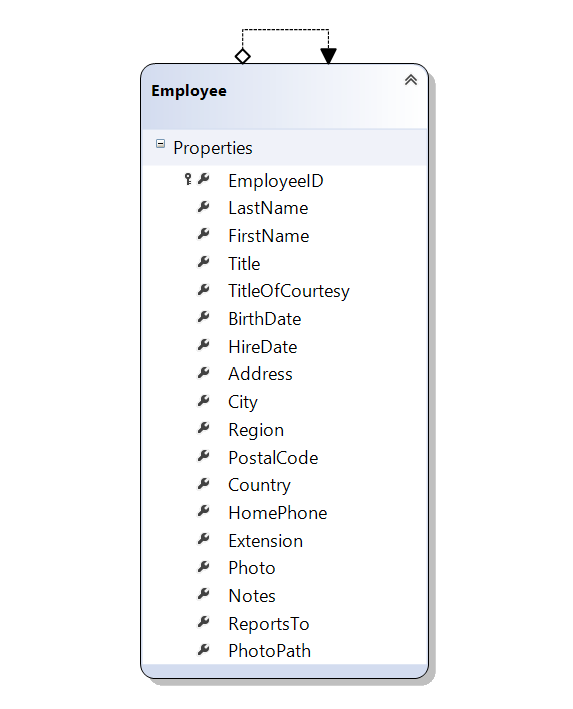
Running a simple select on the table we see the following data:
Employee table
| EmployeeId | LastName | FirstName | Reports To |
|---|---|---|---|
| 1 | Davolio | Nancy | 2 |
| 2 | Fuller | Andrew | null |
| 3 | Leverling | Janet | 2 |
| 4 | Peacock | Margaret | 2 |
| 5 | Buchanan | Steven | 2 |
| 6 | Suyama | Michael | 5 |
| 7 | King | Robert | 5 |
| 8 | Callahan | Laura | 2 |
| 9 | Dodsworth | Anne | 5 |
The solution lies within a Recursive queries with Common Table Expressions in SQL.
In our case we had to do it with a couple of twists to solve our problem. I will guide you through.
Note: This actual example is just didactical and theoretical. You might need to adapt it to your current situation.
The base query and the recursive query:
You need to start with a base case query. In our case we wanted to start from a random point in the hierarchy and from there analyze all the way up. This is because in that random point in the hierarchy we intended to add a son node. With that intention in mind this is our first query. A simple select statement:
USE [Northwind]
GO

DECLARE @FutureParent	INT
SET @FutureParent = 3

-- base query
SELECT Employee.[EmployeeID], Employee.[ReportsTo], 1 AS EmpLevel
FROM [dbo].[Employees] AS Employee
WHERE [EmployeeID] = @FutureParent

GO
This will give as a result:
Query Result
| EmployeeId | Reports To | Level |
|---|---|---|
| 3 | 2 | 1 |
Our recursive query will be to identify somehow who the parents of the previous result are, and so on, and so on until the top.
SELECT Boss.[EmployeeID], Boss.[ReportsTo], 1 AS EmpLevel
FROM [dbo].[Employees]  AS Boss
The previous query will return the original table, without filtering. SO THE QUESTION IS, how to we filter to make sure the selected records are the parents of my base query and so on, and so on, and so on until the very top?
Add both queries with Union ALL
No you whould have a query like this:
SELECT Employee.[EmployeeID], Employee.[ReportsTo], 1 AS EmpLevel
FROM [dbo].[Employees] AS Employee
WHERE [EmployeeID] = @FutureParent

UNION ALL

SELECT Boss.[EmployeeID], Boss.[ReportsTo], EL.EmpLevel + 1 AS EmpLevel
FROM [dbo].[Employees]  AS Boss
This query will throw at the following result. Naturally you will see that the record 3 appears two times in the result and we havent produced a 'hierarchy' yet.
Query Result table
| EmployeeId | ReportsTo | Level |
|---|---|---|
| 3 | 2 | 1 |
| 1 | 2 | 1 |
| 2 | NULL | 1 |
| 3 | 2 | 1 |
| 4 | 2 | 1 |
| 5 | 2 | 1 |
| 6 | 5 | 1 |
| 7 | 5 | 1 |
| 8 | 2 | 1 |
| 9 | 5 | 1 |
Use a CTE and join it with the Recursive query
This is what does all the heavy work. In our query we will join the result of the CT with the Recursive query. This is that will tell us who is the responsible (or boss) of who.
Take a look at the query so far:
DECLARE @FutureParent    INT
SET @FutureParent = 3

WITH EmployeeList AS
(
SELECT Employee.[EmployeeID], Employee.[ReportsTo], 1 AS EmpLevel
FROM [dbo].[Employees] AS Employee
WHERE [EmployeeID] = @FutureParent

UNION ALL

SELECT Boss.[EmployeeID], Boss.[ReportsTo], EL.EmpLevel + 1 AS EmpLevel
FROM [dbo].[Employees]  AS Boss
INNER JOIN EmployeeList AS El
ON Boss.[EmployeeID] = EL.[ReportsTo]
)
See the results with
Select * from EmployeeList
Recursive CTE Result
| EmployeeId | ReportsTo | Level |
|---|---|---|
| 3 | 2 | 1 |
| 2 | NULL | 2 |
Finally we get to see the hierarchy taking as base EmployeeID no. 3 all the way to the top. The numbers in EmpLevel might appear misleading but the higher the number, the higher that person will be in rank in the hierarchy.
The extra step
Our team's need wasn't just to call the data base and get the hierarchy back. We wanted to let the data base to tell us if there might be possible loops in the hierarchy. In te previous example I cannot set again EmployeeID 2 as son of EmployeeID3, that is an example of a loop.
For that we used the EmployeeList CTE within a SELECT CASE like in the following example:
DECLARE @FutureParent   INT
DECLARE @@FutureSon		INT
SET @FutureParent = 3
SET @@FutureSon = 2

;WITH EmployeeList AS
(
SELECT Employee.[EmployeeID], Employee.[ReportsTo], 1 AS EmpLevel
FROM [dbo].[Employees] AS Employee
WHERE [EmployeeID] = @FutureParent

UNION ALL

SELECT Boss.[EmployeeID], Boss.[ReportsTo], EL.EmpLevel + 1 AS EmpLevel
FROM [dbo].[Employees]  AS Boss
INNER JOIN EmployeeList AS El
ON Boss.[EmployeeID] = EL.[ReportsTo]
)

SELECT CASE WHEN EXISTS (
 -- Find if the intended individus is part of the hiearchy already,
 -- thus creating a loop
 SELECT [EmployeeID]
 FROM [dbo].[Employees]
 WHERE [EmployeeID] = @@FutureSon AND [EmployeeID] IN (
	SELECT [EmployeeID] FROM EmployeeList )
 )
-- if the future son exists in the hiearchy,
-- a loop is detected so we return 1
THEN CAST(1 AS BIT)
-- otherwise we return 0
ELSE CAST(0 AS BIT) END
Add this query within a Stored Procedure in your data base and avoid multiple calls to find out loops in a hierarchy.


